Business trip expenses on paper: why they are always late, and what to do about it
An employee gets back from a business trip on Monday, fills in the paper expense form and leaves it on their manager's desk. The manager signs it on Wednesday, when they remember. It reaches accounting on Friday. Accounting waits another week to collect everyone's forms and book them in one go. The money arrives three weeks later. By then the employee has forgotten what the tolls came to, because the receipt is in a jacket that went to the dry cleaner.
This happens every week wherever people travel for work, and everyone treats it as normal.
It isn't. There is a better way.
What a business trip record has to contain
Before going digital, it is worth getting the basics right, because this is where most businesses slip. The exact requirements depend on national rules and your own policy, but almost every business trip record covers:
- Name of the traveller
- Date and time of departure and return
- Destination and purpose
- Means of transport (private car, company car, bus, plane)
- Expenses with receipts attached
- Signature of the person who approves the trip
At least one manager approves the trip, usually the head of department or a director. Without approval, the record isn't valid.
Travel costs (per diems, tolls, accommodation) then have to be settled under the rules that apply to you and reported through payroll. Your accountant usually does this as part of the monthly payroll run, but only if the paperwork arrives on time. That is where it goes wrong.
Note: this article doesn't go into how per diems are calculated. That is an accounting topic of its own. The focus is the process, from creating the record to archiving it.
Where paper goes wrong
If you have ever searched a drawer for a trip from three months ago, you know. But the problem isn't one lost form. It is the process.
Lost paperwork
The employee fills in the form and leaves it on a desk. Someone moves a pile. The form ends up under other documents. When the auditor asks for February's trips, it isn't there, and travel records usually have to be kept for many years.
Late approval means late reimbursement
The manager is in meetings all week, so the form waits five days for a signature. Accounting can't settle it unsigned. The employee waits two or three weeks for their money and is rightly annoyed. That isn't an organisational failure. It is a process that depends on a piece of paper moving from desk to desk.
Retyping means mistakes
Someone copies the paper form into a spreadsheet or the accounting software. Wrong date, wrong amount, wrong expense category. Errors multiply, especially with ten or more people who travel regularly.
No overview
How much did your sales team spend on travel this quarter? How many trips are still unsettled? Who travels most? On paper, answering takes hours of digging. Digitally, one click.
Is a digital record legally valid?
This comes up a lot, and the answer is yes. Across the EU, the eIDAS Regulation means an electronic signature can't be refused legal effect just because it is electronic. What matters is that the document guarantees authenticity (you know who signed) and integrity (nobody can change it later without leaving a trace).
In practice a digitally signed record with a verifiable signature, such as a QR seal with hash verification, carries the same weight as paper with a handwritten signature.
This matters because many directors and accountants still hold back, assuming the inspector won't accept digital. Tax authorities have been accepting electronically signed business documents for years. For the background, see what a digital signature is and whether you need one.
What the digital flow looks like in Kloki
Picture the whole process taking a few minutes of work instead of a few weeks of waiting. This is how it works in Kloki travel expenses:
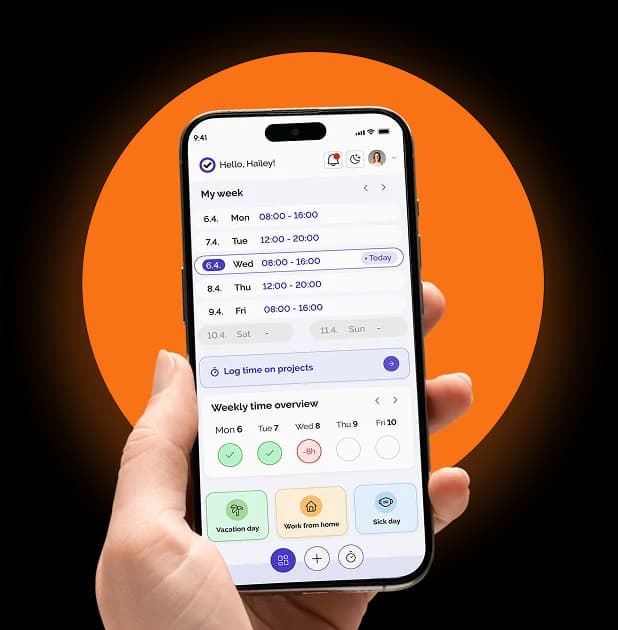
1. The employee creates the trip in the app Before leaving, the employee opens Kloki and enters the basics: destination, purpose, dates and means of transport. About two minutes.
2. The manager approves in one click The manager gets a notification on their phone or by email, opens the trip, reviews it and approves. No waiting for paper to land on a desk.
3. Expenses with photographed receipts On the road or back home, the employee photographs receipts and attaches them. Kloki reads the amount, date and merchant from the photo and proposes an expense line, which the employee accepts or edits. Tolls, parking, accommodation and fuel sit in one place, with proof attached.
4. The calculation is done for you Kloki calculates costs from what was entered: mileage at the per-kilometre rate you set, and per diems by country and time spent there. Every per diem can still be edited, so it follows your policy. No retyping, no typos. To check how far a trip actually was, use the free distance calculator.
5. Ready for accounting Your accountant gets a finished claim as a PDF, an export for the whole period or a ZIP with all the receipts, ready to book. A settled claim can also be sent for digital signature and stored in the document archive. Your accountant can have their own access, so nobody has to forward anything.
A process that takes three weeks today can take three days. Or less.
A day on the road is a working day
Often missed: a day on a business trip is a working day and has to show up in your working time records. With one tool for travel and another for time tracking, someone reconciles the two by hand. In Kloki, travel expenses and time tracking are part of the same system, so trip days land in the records on their own.
Why now
Going digital with business trip expenses isn't a trend. It is basic hygiene. Every day on paper is a day in which you:
- Risk losing a document
- Pay employees back late
- Lose hours to admin instead of real work
- Have no overview of travel costs
The fix is simple. You don't need to reorganise the business. You just stop using paper for something paper does badly.
Try it free and see how it works when nothing waits on a desk. Digital documents aren't late. Only paper is.
If you want to know how digital signatures work across all your HR documents, not only business trips, we cover that in a separate post.