Your whole company in one spreadsheet. That only one person understands.
Hours, vacation, sick leave and payroll inputs live in spreadsheets kept by one person. If they don't come in tomorrow, nobody knows where anything is or what it means. Kloki turns that into structure: the data lives in a system, you see it without asking, and anyone can take over any role.
- See hours, vacation and absences without asking anyone
- Nothing depends on one person and their spreadsheet anymore
- Every entry logged per person, with a trail of who entered what
- Payroll report ready, from the data in the system
- 0+ companies already pay for Kloki and renew
From small teams to businesses of 200+ people
Hertz, mer, Affidea, Agramservis and many others.



















 Google
What if that person doesn't come in tomorrow?
Resignation, sick leave, vacation or just a bad day. Until it happens, "we have a spreadsheet" sounds organized. What it really means is "we have one person".
Who can open that spreadsheet if the person who keeps it doesn't come in tomorrow?
Payroll stops until someone else tries to decode it.
Who understands the formulas, abbreviations and cell colors?
One wrong row and a vacation balance is off, and nobody notices.
Who has access while that person is on vacation or sick leave?
You wait for them to come back or guess the hours and absences.
What do you show an inspector if the file is on someone else's laptop?
You have nothing to prove your working time records with.
Do you have a backup of the knowledge, not just a copy of the file?
A copy of the spreadsheet doesn't carry the process that lived in that person's head.
Kloki takes each of these questions off the table. Here's how.
Structure instead of a spreadsheet in someone's head
The same records you keep today, only they no longer depend on one person and one file.
Structure
Data in a system, not in a private spreadsheet
Hours, vacation, sick leave and payroll inputs sit in one place, under the same rules for everyone. Not in a file on one computer, kept by one person.
Knowledge backup
Everything logged per person, always visible to the owner
Every entry shows who made it and when. The owner sees the current state at any moment without asking anyone. The backup is not a copy of a file, it is knowledge that lives in the system.
Replaceability
Every role can be taken over, no secret knowledge
A new person takes over from the system, without learning someone else's shortcuts and formulas. A staff change stops being an operational incident.
Doing it by hand costs you every month
A small company easily loses 4 working days a month to HR paperwork, mostly copying other people's data. That isn't free, it's just hidden.
Today · by hand
~€320/mo
4 working days × roughly €80, the daily cost of the person who keeps the records.
With Kloki
from €49/mo
Per company, not per user. The price depends on team size, not on the number of modules.
The figures are illustrative and depend on the salary of the person keeping the records. The point is not the exact amount, it's that paperwork has a price you pay every month without seeing it on an invoice.
Kloki is not an ERP. And doesn't try to be.
Almost every company has an ERP or accounting software, and that's fine. Kloki is not here to replace it. The ERP is where data ends up. Kloki is where it is created.
Today · data ends up in the ERP
Notes, emails and spreadsheets
You collect data in a pile and send it to the accountant when you get round to it.
The accountant retypes it
Line by line into the ERP, buried in someone else's data they have to decode.
You ask for the status and wait
For every figure about your own company you call the accountant and wait for an answer.
With Kloki · data is created at the source
People enter it themselves
Hours, vacation and absences are entered at the source, accurate and logged per person.
Kloki builds the finished input
The payroll report and records are ready, without retyping line by line.
The accountant books it, the owner sees it
The accountant gets order instead of chaos, and you see the numbers without a middleman.
Kloki prepares data for the ERP, it doesn't replace it.
Instead of a pile of emails and notes to decode and retype, the accountant gets a finished input for booking. Less manual work for them, visibility without asking for you, and easy entry at the source for your people.
0+ companies have seen the difference. They pay and renew.
Seen this before?
Open any conversation.
The spreadsheet works. You're the one filling it in.
No more:
- Retyping other people's hours from emails, messages and sticky notes
- The same question ten times a week: "how many vacation days do I have left?"
- Leave and sick-leave requests lost in hallways and chats
- Delays while you wait for someone else to fill something in
- Mistakes because the data was copied by hand
Approve in one click
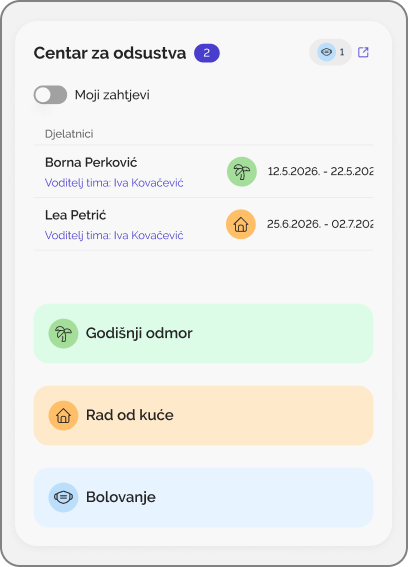
An employee picks the dates and sends the request. The manager gets a notification and approves it in one click. Leave balances update on their own.
Learn more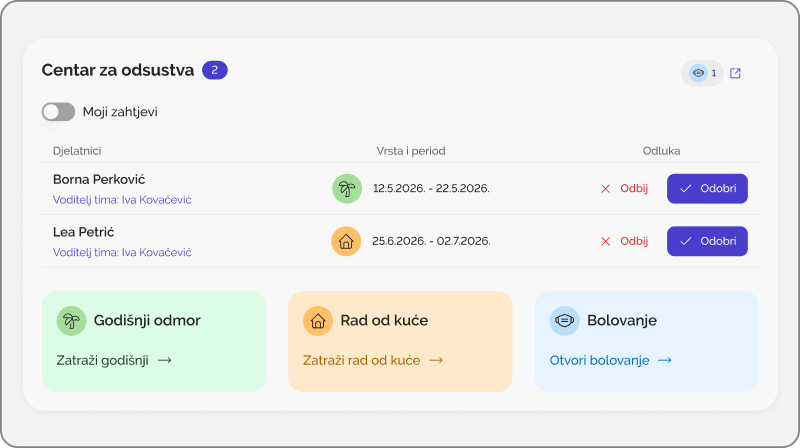
“We already have a spreadsheet.” Keep the process, lose the typing.
A small business can lose four working days a month on HR paperwork, most of it retyping other people's data. Your records stay the way you keep them. What changes is who enters them.
What happens when the person who keeps the spreadsheet leaves?
Who enters the data?
Who can see their own hours and balance?
How do people request leave or report sick?
How often does someone ask HR?
Employee · convenience
- Requests vacation, sick leave or time off on their own
- Sees their hours, leave balance and shift schedule right away
- Everything from their phone, in the field or on shift
- Knows where they stand, the request goes straight to their manager
HR / manager · stays in control
- Approve or decline a request in one click
- Full overview of who is where: vacation, sick leave, field work
- Payroll report ready from data people entered themselves
- Approvals and month locking stay in your hands
You stay in charge. You just stop doing the typing.
Three steps, and the typing is no longer on you
The employee submits, the manager approves, HR has the overview and a finished report. You still run things, just without retyping.
Step 01
The employee submits
Vacation, sick leave, an absence or hours: the employee enters it themselves, from the app on their phone, out in the field or on a shift.
Step 02
The manager approves
The request reaches the manager by email and on their phone straight away. Approve or decline in one click; control and locking stay with you.
Step 03
HR has the overview and the report
Every entry is logged per person. You see who is where at any moment, and the payroll report comes from the data people entered themselves.
For the owner and the accountant
Costs and bookkeeping in the same place as your people
Your accountant for freeNew
The Accountant role has its own dashboard and guide and does not count towards billed users. It sees only accounting data and cannot change anything.
Monthly expenses
A register of the company's subscriptions and fixed costs, plus the monthly salary cost per employee, with totals for the month and the year.
Expense claimsNew
An employee snaps a receipt, AI reads it, and accounting exports an Excel file with the accounting journal entry.
More about expense claims
1,000+ employees already track their work in Kloki.
A great app at a very reasonable price, unlike most of the others I came across. It simply does what it should, quickly and without fuss. Support answers fast too, so I recommend it wholeheartedly.





See the price for your team
Drag the slider and see the price for your team instantly.
Find the plan that fits your headcount.
No bundles, add-ons or paid extra modules. Hours, leave, sick leave, shifts, travel expenses, e-Archive, hiring, CRM and chat. One price, everything included, for everyone.
- All platform features
- GDPR-compliant · EU hosting
- Up to 20 users
- 10 GB of e-Archive storage
All plans
| Plan | People | Monthly | Yearly | e-Archive |
|---|---|---|---|---|
| Up to 20 | up to 20 | €49 | €41 | 10 GB |
| Up to 50 | up to 50 | €99 | €82 | 25 GB |
| Up to 100 | up to 100 | €149 | €124 | 50 GB |
| Enterprise | 100+ | custom | custom | 200 GB+ |
Frequently asked questions
Don't let your company stop when one person leaves
7 days free. No credit card.
- Data in a system, not in a spreadsheet one person understands
- See hours, vacation and absences without asking anyone
- Every role replaceable, no handover of cryptic spreadsheets
- Employees submit, managers approve in one click
- Set up in 15 minutes, invite employees in one click
From €49 a month for the whole company. No credit card. EU hosting.
30-day money-back guarantee, no questions, no notice period. Terms →