Vacation tracking without the headache: no lost approvals, no guessing who's off
June. Three people want the same week off. The department head says he approved it, but there's nothing in his email. A new hire who started at the end of April asks how many days she gets this year, and nobody knows offhand. HR opens the spreadsheet: last updated in March. In August a labour inspector asks for your leave records. Where are they?
Most businesses with 10 to 50 people track vacation the same way: a spreadsheet, some email and a lot of goodwill. It more or less works. Until vacation season, an inspection or a dispute with an employee, when "more or less" stops being good enough.
What the rules expect from vacation records
Across the EU, the Working Time Directive (2003/88/EC) gives every worker at least four weeks of paid annual leave a year. That minimum can't be swapped for money except when employment ends. National rules add to it: extra days, carry-over limits, deadlines for using last year's leave.
The Court of Justice of the EU added a detail that matters in practice: leave doesn't simply expire because the employee never asked for it. If you want unused days to lapse, you have to show that the employee had a real chance to take them and was told in time what would happen otherwise. The burden of proof is on the employer.
So you want each of these on record:
- the employee's request
- the decision: who approved it and when
- days used and the remaining balance
- the leave plan for the current year
- any carried-over days and the date by which they must be used.
The last one causes the most trouble. In May someone realises they still have 8 days from last year and wants to use them before the deadline. Two colleagues from the same team already have that week approved. Cue panic, overlaps and a manager deciding on data that doesn't exist.
Why a spreadsheet isn't the answer
Spreadsheets are a fine tool. For vacation tracking in a team of more than ten people, they aren't enough.
Versions
Who updated the file last, HR or the team lead? Is this the copy on OneDrive or the one someone downloaded in March and has been editing locally ever since? Two sources of truth means none. When the team lead keeps one sheet, HR another and the director asks a third person, you have three versions of the same data and none of them complete.
No approval workflow
An employee emails a request. The manager replies "ok". The email sinks under a hundred others. Or the approval happens in the corridor between two meetings. Three months later nobody can prove it was ever given, because there is no structured record of approvals. In a dispute, proving it is your job.
Balances counted by hand
Every "how many days do I have left?" means opening the file, checking the entitlement, subtracting what was used, checking whether last year's days carried over, and only then answering. Five minutes per person. Thirty people asking in June is half a working day.
No view of the team
A manager wants to know who's off next week, this month, or during the big project they're planning. In a spreadsheet that means filtering, sorting and hoping the data is right. It never quite is.
A digital workflow: request to approval in minutes
Replace the email, WhatsApp and spreadsheet with this:
1. The employee sends a request in the app
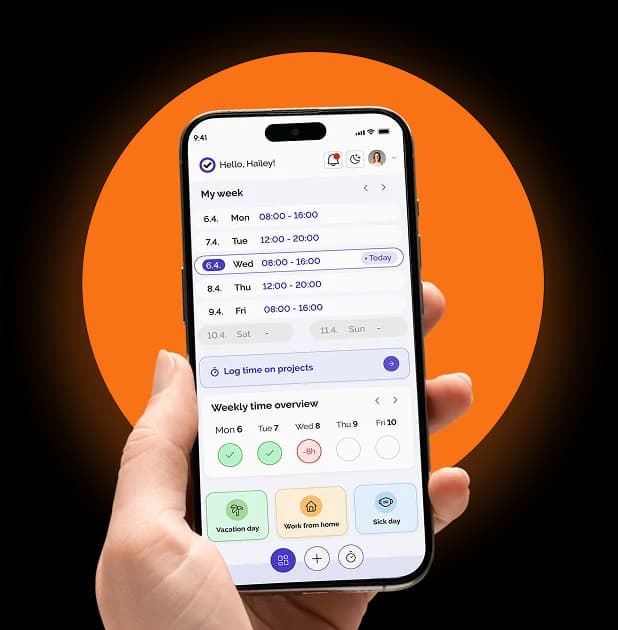
They open Kloki, pick the dates, see their remaining balance and send it. Thirty seconds, from a computer or the Kloki GO mobile app.
2. The manager gets notified
A push or email arrives: "Mark is requesting vacation from 14 to 18 July." The manager sees who else on the team is off that week without asking HR, then approves with one click or declines with a comment.
3. The records update themselves
The balance drops immediately. No typing it in, no forgotten updates. "Approved" and "recorded" are the same step, so there is no gap between them.
4. HR and management see the whole team
One screen: who's off, how many days everyone has left, where the overlaps are. No spreadsheet, no asking around, no guessing.
What used to take days (email the request, wait for a reply, copy it into a sheet) now takes minutes, and every step is on record.
When the inspector arrives
Labour inspections don't always announce themselves. An inspector can ask for leave records for any period and expects to see them on the spot.
With paper or a spreadsheet, that means opening folders, hunting for documents, explaining why some requests have no written approval and hoping nothing is missing.
In Kloki, every approved request already has a PDF approval document filed under the employee, and the history shows who asked for what, who approved it and when. The inspector gets tidy records, you keep your afternoon, and it takes less time than finding the right drawer.
Speed is only half of it. Digital records prove you ran the process properly, because every action leaves an audit trail that can't be edited after the fact. With paper or a spreadsheet the question always hangs there: was this added later?
Overlaps, carry-over, balances: handled automatically
Some vacation problems aren't about goodwill but arithmetic. This is where a system earns its keep.
Overlaps: before approving a request, the manager sees how many people from the team are already out on those days. No more Monday mornings where three people from the same team turn out to be at the beach while the project is on fire.
Carry-over: Kloki tracks how many days were carried over and the date by which they must be used, according to the rules in your settings.
Balance: every employee can see their remaining days at any time without asking HR. HR stops answering the same question every month.
The link to time tracking
Vacation is an absence, and every absence belongs in your working time records. An inspector doesn't look at leave in isolation but at the whole picture: how much someone worked, how long they were away and why.
Run vacation in one system and hours in another, and you reconcile them by hand. In Kloki, approved vacation shows up as an absence in time tracking automatically. One system, one source of truth.
Vacation doesn't have to be a headache
The process that generates the most questions, emails and frustration in most businesses is also the easiest to digitise. Request, approval, records, overview, all in one place.
No lost emails. No "how many days do I have left?" five times a week. No June panic when everyone suddenly wants their carried-over days. No stress when the inspector shows up, because the records are always current.
See how vacation management works in Kloki, or try it free and stop tracking leave on paper and in spreadsheets.
And for what to do when an employee says you approved their time off and you don't remember, read our post on decision history and the audit trail.