No more free Clockify? Here's the best alternative for tracking employee hours
Clockify has changed the terms of its free plan. The user limit, which used to be unlimited, is now capped at five. There's no Excel export, and reports cover a maximum of 31 days.
For a freelancer or a team of a few people, it's still usable. For a company with 20, 50, or 100 employees, it means one of two things: upgrading to a plan billed per user, or going back to tracking hours in spreadsheets. But there's a third option.
Your free Clockify plan now supports just 5 people
According to Clockify's documentation (as of September 2026), the free plan now comes with:
- A maximum of 5 active users, including the owner. After the trial ends, only the owner and the first 4 invited users stay active; everyone else is deactivated automatically.
- Excel and CSV export on paid plans only. PDF export stays free.
- Reports limited to 31 days each, with no full-year view in a single report.
- Billable hours and shared reports moved to paid plans.
- Users can only edit their own time entries.
- All projects are public, and permissions for creating clients and projects can't be restricted.
Unlimited users was the main reason companies with dozens of employees stuck with the free plan. Three of these changes hit exactly what a growing team relies on. Without Excel export, hours have to be retyped by hand for payroll. A 31-day report gives you no annual overview. And admins can't fix a teammate's missed clock-out.
How much more you'll pay
Clockify bills per user. With annual billing, plans cost €3.99 (Basic), €5.49 (Standard), €7.99 (Pro), and €11.99 (Enterprise) per user per month, before tax. Monthly billing costs more.
Which plan you actually need matters, because the features a company with employees relies on sit in the higher tiers:
- Basic adds Excel export, breaks, and logging time for others.
- Standard is the first plan with time off tracking, attendance and overtime, request approvals, and GPS tracking.
- Pro adds shift scheduling and expenses.
- Enterprise is the only plan with an audit log.
For a company tracking employee hours, Standard is the realistic minimum. That's €65.88 per employee per year. Every new hire grows the bill: ten new people add €658.80 a year, and that's still without shift scheduling, which requires Pro.
A more affordable, reliable alternative: Kloki
Kloki is a time and attendance and HR platform priced per company, not per user. Every module is included in every plan, with no add-on fees per feature or per employee.
Here's what you get:
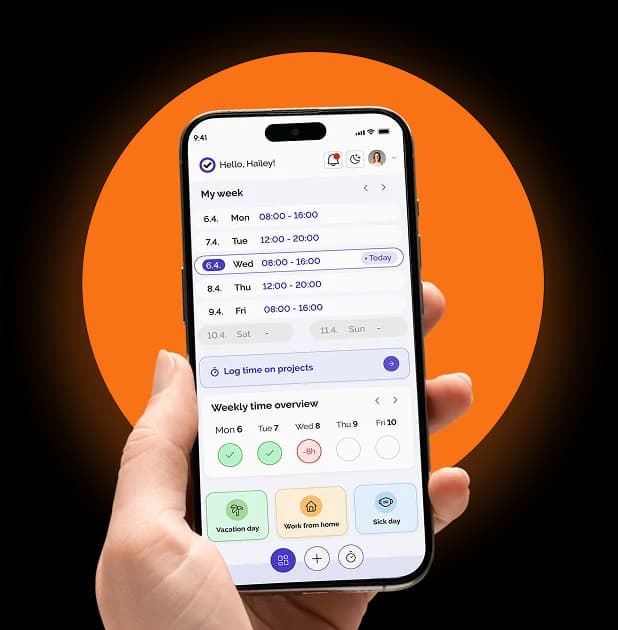
- Time tracking with clock-in/clock-out, breaks, and location
- Attendance history with no date-range limit, plus missed clock-out corrections
- Automatic hour categories for night shifts, weekends, holidays, and overtime, with presets for office, two-shift, and three-shift schedules
- A payroll-ready Excel report with hours already sorted by category
- Shift scheduling, with a live view of who's on the clock and who's scheduled but hasn't clocked in
- PTO, sick leave, and remote work, with requests submitted from a phone and approved by managers
- Business travel and mileage tracking
- Project hours with work descriptions and billable flags
- Geofencing: approved clock-in locations with a custom radius each, and a choice to flag or block clock-ins outside them
- Document storage, e-signatures, and employee records
- Job postings, CRM, and expense tracking
- The Kloki GO mobile app for iOS and Android
- Enterprise-grade security with encryption, access control, and a full audit log
Kloki doesn't change how you track time. It changes who enters the data: employees log their own hours and submit requests, managers approve them, and HR and payroll get ready-to-use reports.
Feature comparison: Clockify vs. Kloki
| Feature | Clockify | Kloki |
|---|---|---|
| Excel and CSV export | Basic and up | Yes |
| Attendance and overtime | Standard and up | Yes |
| PTO, sick leave, remote work | Standard and up | Yes |
| Request approvals | Standard and up | Yes |
| GPS / geofencing | Standard and up | Yes |
| Shift scheduling | Pro and up | Yes |
| Expense tracking | Pro and up | Yes |
| Audit log | Enterprise only | Yes |
| Payroll-ready hour categories | No | Yes |
| Business travel and mileage | No | Yes |
| Document storage and e-signatures | No | Yes |
| Employee records, job postings, CRM | No | Yes |
Price comparison: Clockify vs. Kloki
Annual cost, before tax. Clockify prices are for the Standard plan.
| Employees | Clockify Standard | Kloki |
|---|---|---|
| 20 | €1,318 | €492 |
| 50 | €3,294 | €984 |
| 100 | €6,588 | €1,488 |
| 150 | €9,882 | Custom pricing |
On Clockify Enterprise (€11.99 per user per month) the gap is even bigger: €14,388 a year for 100 employees.
A 100-person company pays €6,588 a year on Clockify Standard and €1,488 on Kloki. That's €5,100 saved every year, and Kloki includes shift scheduling and an audit log, which Clockify reserves for Pro and Enterprise.
Kloki pricing
| Plan | Monthly billing | Annual billing (per month) | Document storage |
|---|---|---|---|
| Up to 20 employees | €49 | €41 | 10 GB |
| Up to 50 employees | €99 | €82 | 25 GB |
| Up to 100 employees | €149 | €124 | 50 GB |
| Enterprise | Custom | Custom | 200 GB+ |
The break-even point is low. The up-to-20 plan beats Clockify Standard from your 8th employee, the up-to-50 plan from your 15th, and the up-to-100 plan from your 23rd. Hiring doesn't raise your time-tracking bill either: the price only changes when you move up a tier. Details are on the pricing page.
When is Clockify still the better choice?
If you're a freelancer or a team of up to five, track time by project to bill clients, and don't need to track employee attendance.
Kloki makes sense in every other case: you have employees, you run shifts or multiple locations, and you send hours to payroll every month. And if you want real people on the support team who are there when you need them.
Can I import my employee list from an existing spreadsheet?
Yes, from Excel, CSV, or PDF, with automatic data detection. Moving employee data over is usually what slows companies down the most. In Kloki, it's a quick import: upload your employee spreadsheet, review the detected data, and confirm. Two clicks, not a project that drags on for weeks. If you'd rather not deal with it, our team will gladly import your employees for you.
Have questions about switching to Kloki? Reach us at info@kloki.app or try Kloki free.