
Leave management software for small business: when the vacation spreadsheet stops working
In a team of five, vacation tracking is easy. Everyone knows who is away, the owner remembers who asked for what, and a spreadsheet with one row per person does the job.
Then the team grows to fifteen, then thirty. Requests arrive by email, in chat, in the corridor. Someone approves a week off and forgets to write it down. Two people from the same team are away at the same time and nobody noticed until Monday. And at least once a week someone asks the same question: "How many days do I have left?"
That is usually when a small business starts looking for leave management software. This post covers what a vacation tracker should do for a small team, what to watch out for, and how to switch without turning it into a project.
Signs your vacation spreadsheet has reached its limit
The spreadsheet rarely breaks all at once. It wears down. Typical symptoms:
- Adding up days by hand. Every request means opening the file, finding the row and subtracting. One wrong cell and a balance is off, and nobody notices for months.
- Not knowing who approved what. The approval lives in an email thread or a chat message, if it was written down at all.
- Overlaps in the same team. Two people from a small team on vacation the same week, because whoever approved the second request didn't see the first.
- Digging for old approvals. An employee says the days were approved. You search your inbox for proof.
- Mistakes in carried-over days. Days left over from last year, with a deadline by which they must be used, are the first thing a spreadsheet gets wrong.
If three or more of these sound familiar, the spreadsheet already costs more than it looks. For what happens when an approval can't be found, see an employee claims you approved their leave.
What leave management software for a small business should do
You don't need an enterprise HR suite to fix this. You need a handful of things done reliably.
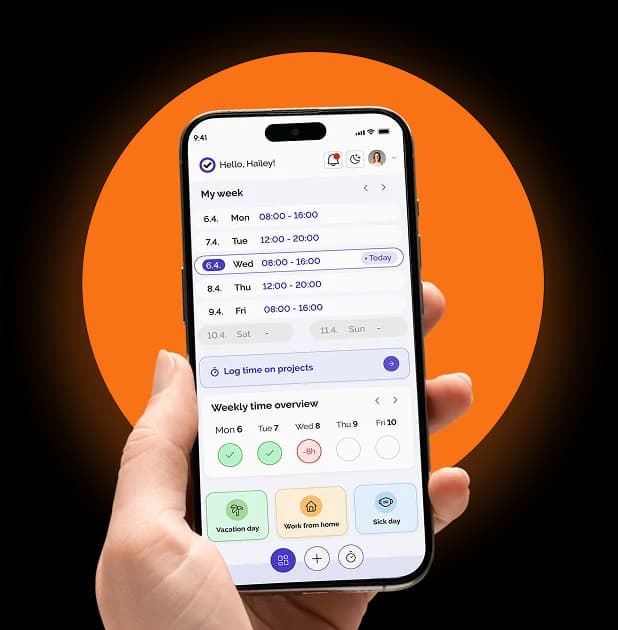
Requests from a phone, approval in one click
The employee picks the dates and sends the request from a phone or computer, in two taps. The manager gets a notification and approves or declines in one click, and the employee hears back straight away. No emails, no paper, no "did you write that down?".
Balances that are always correct
Each employee's entitlement is set once, and the system keeps the balance current: used, scheduled and remaining days at a glance. That includes a pro-rated balance for new hires, so nobody has to calculate a partial year by hand.
Carry-over rules and deadlines
You set your carry-over rules and the use-by deadline once. From then on the balance follows them, instead of someone keeping a separate note that "Ana still has three days from last year until June".
A team calendar before approval
The manager should see who else is away in the same period before approving, so overlaps and coverage gaps are obvious before anyone clicks. For teams that work in shifts, people on leave should show up as gaps in the schedule.
A written record of every approval
Every approved request should leave a document behind. In Kloki, each approval generates a PDF approval letter, archived per employee and ready to sign. When a question comes up a year later, the answer is one click away.
Rules that fit your country
Leave rules differ from country to country, and a good tool doesn't hard-code one set of them. Minimum days, carry-over and use-by deadlines should be settings you adjust to national rules in your country.
Year-end without the January panic
The busiest moment in leave management is the turn of the year. Everyone needs next year's days, and requests that span the new year can't be sent until those days exist.
Kloki handles this in three ways:
- Bulk allocation gives every employee their vacation days in one step, instead of one by one.
- Scheduled allocation adds the days on 1 January by itself. Anyone who gets part of their days before then receives the difference.
- A timely reminder tells you when nobody has vacation days for next year yet.
Planning time off around holidays
Employees plan vacations around public holidays, and so do managers who have to keep the team covered. Two free tools help with that planning even before you choose any software:
- The bridge days planner shows where a few days of leave turn into a long break.
- The working days calculator counts working days in a period, so a request for "two weeks" becomes an exact number of days.
Vacation tracking is part of a bigger picture
Leave rarely lives on its own. Approved vacation affects working time records, shift schedules and payroll. When the vacation tracker is a separate tool, someone ends up copying approved days into the time tracking system by hand, and the old spreadsheet problem comes back in a new place.
In Kloki, approved leave lands in time tracking and in the team calendar automatically. Sick leave, remote work and shift schedules sit in the same system, so the manager sees the whole picture, not just one slice of it.
What it costs for a small team
Many HR tools charge per user, so the bill grows with every hire. Kloki has one price for the whole team, set by team size:
- €49 a month for up to 20 people
- €99 a month for up to 50 people
- €149 a month for up to 100 people
Requests, approvals, PDF letters and reports are included, together with sick leave and time tracking. There are no add-ons and no "that's in a higher plan".
How to switch in an afternoon
Moving from a spreadsheet doesn't have to be a project. A realistic plan for a small business:
- Sign up. Two minutes, no card.
- Set entitlements and carry-over rules once. Bring over the current balances from your spreadsheet.
- Invite the team. From then on, people send requests from their phones and managers approve in one click.
Setup takes about 15 minutes without IT support, and the first 7 days are free. If you pay and it isn't for you, tell us within 30 days and you get the full amount back.
The short version
Leave management software for a small business doesn't need to be complicated. It needs to answer "how many days do I have left?" without anyone opening a spreadsheet, show overlaps before they happen, and leave a written record of every approval.
See how it works on the vacation management page, or Try it free: the first 7 days cost nothing.