Office management software: one tool instead of ten spreadsheets
Every small business has one: the person who keeps the office running. They know who is on vacation next week, how many days everyone has left, which travel expense is still waiting for a signature and where last year's overtime records are.
They also keep all of it in spreadsheets. One for hours, one for vacation, one for sick leave, one for expenses, a few more that started as "just for now". It works, mostly. Until that person is on vacation, off sick, or hands in their notice.
This post covers what office management software should change, and what it shouldn't.
The real problem isn't the spreadsheet
Spreadsheets are a fine tool. The problem is how the data gets into them and who understands it afterwards.
Someone else's data, typed by hand. The office manager copies hours from emails, vacation requests from chat messages and sick-leave notes from the corridor. Every copy is a chance for a mistake.
The same questions over and over. "How many vacation days do I have left?" ten times a week. "Did you get my request?" Every one of those is an interruption.
Waiting on other people. Payroll can't close because someone hasn't sent their hours. A request sits because the manager hasn't replied to an email.
Knowledge that lives in one head. The formulas, the abbreviations, the cell colours. A copy of the file is not a backup of the knowledge. You saved the cells, not the rules that exist only in the head of the person who keeps the spreadsheet.
That last point is the one owners tend to underestimate. Until it happens, "we have a spreadsheet" sounds organised. What it really means is "we have one person". We go deeper into this on the why Kloki page.
What office management software should do
Good office management software doesn't add work for the office manager. It moves the typing to where the data is created, and leaves control where it already is.
Employees enter their own data
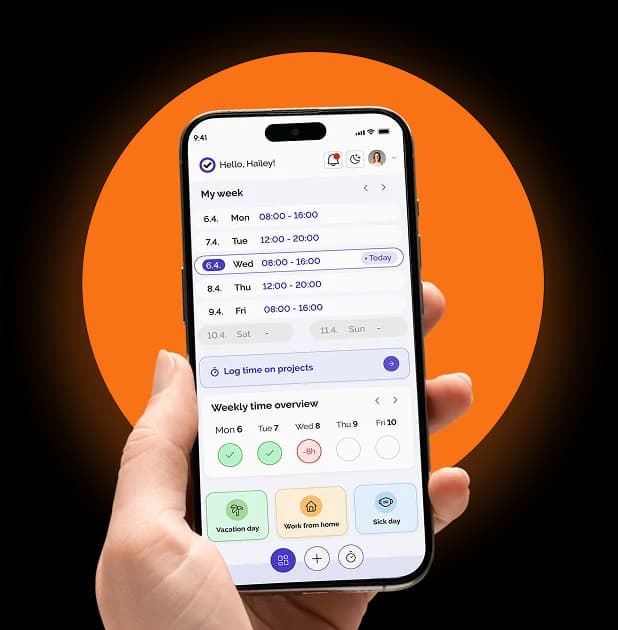
Hours, vacation, sick leave, absences and expenses: the employee enters them, from a phone, out in the field or on a shift. Nobody retypes them.
Managers approve in one click
Every request goes to a manager for approval. It reaches them by email and on their phone straight away, and they approve or decline in one click.
The office manager keeps control
Employees entering their own data doesn't mean losing control. Every change is logged per person, so you can always see who entered what and when, and you can lock a period at any time. You still approve, review and lock. You just stop retyping.
Everything in one place
The point of one tool is that the overview is in one place. Who is in, who is away, who is on the road, at any moment, without asking anyone.
What fits into one tool
When people hear "one tool" they expect a stripped-down version of each piece. In Kloki, these modules are included in one price:
- Time tracking. Clock in from a phone, hours add themselves up, payroll report in one click.
- Project time tracking. Timer or manual entries per project, client and tag.
- Vacation and sick leave. Requests from a phone, one-click approval, balances always correct.
- Remote work. Tracked alongside the rest of the attendance records.
- Shift scheduling. Build the schedule in a calendar, employees see it on their phones.
- Travel expenses. Mileage at your rate per kilometre and per diems by country calculated for you, receipts photographed on a phone.
- Document archive, hiring and CRM.
- Team chat. Channels, direct messages and groups for the whole team, with a mobile app.
There is also a place for costs. Expense claims work by snapping a receipt: AI reads it, and accounting exports an Excel file with the accounting journal entry. A register of monthly expenses keeps your subscriptions and fixed costs together with the monthly salary cost per employee.
The full list is on the features page.
Your accountant gets order instead of a pile
Most businesses already have an ERP or accounting software, often at their accountant's. Office management software is not here to replace it.
The ERP is where data ends up. Kloki is where it is created. Instead of a pile of emails and notes the accountant has to decode and retype line by line, they get a finished input for booking: payroll inputs ready at the end of the month, from the data people entered themselves.
The accountant can also work in Kloki directly. The Accountant role has its own dashboard and guide, does not count towards billed users, sees only accounting data and cannot change anything.
Do you have to give up your spreadsheets?
No. What changes is who enters the data. Instead of one person retyping everything, employees do it themselves and the office manager keeps the control, the approvals and the overview.
Their job doesn't disappear either. What they do changes, not whether you need them. Less copying other people's data, more of the work that actually needs a person.
What it costs
The hidden cost of doing it by hand is easy to miss because it never shows up on an invoice. A small team can easily lose several working days a month to HR paperwork, mostly copying other people's data. The exact number depends on your team, but it's never zero.
Kloki has one price for the whole team, not per user, and the price depends on team size, not on the number of modules:
- €49 a month for up to 20 people
- €99 a month for up to 50 people
- €149 a month for up to 100 people
- above 100 people, by agreement
Yearly billing lowers the monthly price further. See the details on the pricing page.
How to get started
- Sign up. Two minutes, no card. Invite employees in one click.
- Everyone enters their own. Hours, vacation, sick leave and expenses from their phones.
- You approve and export. One-click approvals, finished reports for payroll and accounting.
Setup takes about 15 minutes without IT support. The first 7 days are free, and if you pay and it isn't for you, tell us within 30 days and you get the full amount back.
The short version
Office management software should do three things: let people enter their own data, keep approvals and control with you, and put the whole picture in one place so the business doesn't stop when one person is away.
If your office still runs on ten spreadsheets and one person who understands them, Try it free: the first 7 days cost nothing.