Card reader or app: do you need hardware for time tracking?
Say "attendance" and most people picture cards, readers and a terminal by the door. A reader is one way to record working time, not the only one. Several digital options need no installation and no big upfront spend.
When people work in different places
With a classic system, employees use a card, a key fob, a PIN or another identifier when they arrive and leave. That stops working when part of the team is:
- in the field
- on building sites
- in branches
- at client premises
- at home
- or moving between several locations.
Those people need to record their time where their work actually starts and ends.
The alternatives to a reader
There are two common ways to record time digitally:
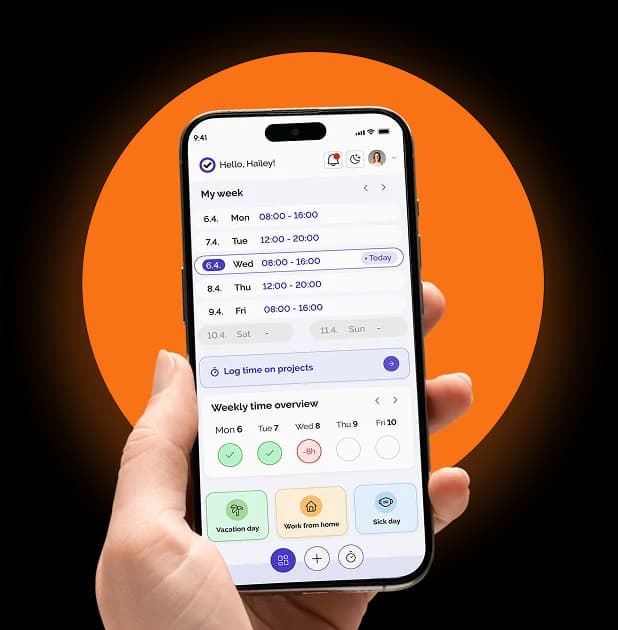
- Mobile app: employees clock in and out on their own phone. Practical for field workers and anyone without a fixed workstation.
- Computer or tablet: employees clock in through a web app, on their own computer or on a shared device in the office, branch or workshop.
What you need besides arrivals and departures
Depending on the business, you also track total daily hours, breaks, field work, absences and special categories such as night work, overtime and shift work. And you need to know who is on holiday, on sick leave or on unpaid leave.
This is where a reader runs out. It records timestamps, but it doesn't sort hours. If you want something that costs little up front and works on a laptop or a phone, that is what an app gives you.
In Kloki hours are sorted automatically into work types you set up yourself:
- by time: hours in a set range go to their own work type (for example night work 22:00 to 06:00, or an afternoon shift 14:00 to 22:00)
- by day: the whole day counts separately (for example Sundays and public holidays)
- by threshold: hours above a limit split off into overtime (for example above 8 h a day)
For the usual cases there are templates by type of work (office, two shifts, three shifts), so the basic work types come from a single choice. The same work types then feed the payroll report, which also lists every kind of absence. More on sick leave.
So look at the whole process, not just at how someone clocks in.
How do you know they were really on site
The usual objection to apps: a card is used at the door, a phone can be used anywhere. That is what geofencing in Kloki is for. You define allowed clock-in locations, each with a radius between 50 and 500 metres, and choose how strict the rule is:
- Warn: a clock-in outside the location is recorded with a warning and goes through.
- Block: a clock-in outside the allowed locations is refused.
You can also approve IP addresses, so a clock-in from the office network counts as on site.
Unlike a reader, an exception doesn't have to stop work. A field worker who is legitimately at another address still gets their arrival recorded, and the manager sees the deviation in the log and can check it. Work locations are a separate list: add a building site, branch or field location when a project starts and switch it off when it ends, with no equipment to install at each address. More on attendance clock-in.
Live overview and corrections
Managers have a Who's at work view that refreshes on its own and shows two lists: who is clocked in right now, since when, from which location and whether they are on a break; and who is rostered for a shift running now but hasn't clocked in. From the same view a manager can edit an entry, add one or stop the clock.
For the month there is a daily attendance overview filtered by period and employee. For each day you see total hours, break time and when the person was clocked in. Entries still running are marked separately.
Reader or app: which suits you
There is no single answer. A reader can make sense if everyone works at the same place and you want a physical device at the door.
An app is more practical if people work in different places, move around, or work at addresses that change over time. There is also no hardware to buy, install and maintain, which makes a real difference to the budget of a small or mid-sized business.
What matters is that the record matches how people really work and is kept accurate and up to date. To see how it works in Kloki: Try it free.