5 best time-tracking tools in 2026 — and which one fits your company
You search for a time-tracking tool and Google hands you twenty options. Clockify, Toggl, Hubstaff, a handful of HR suites, and a long tail of niche apps. Each one promises the same thing: "simple time tracking." But once you try to apply any of them to a real company of 15 or 30 people, you realize most are built for a single use case — usually billable project hours — and quietly leave out everything else: leave management, shift work, expense reports, document signing.
We picked five tools that small and mid-sized employers most often shortlist, and compared what each actually does well — and where each falls short.
What to look for before you pick
Before the comparison, here is what a serious time-tracking tool should cover if you run a real team (and not just bill by the hour):
- Compliant work-time records — most labour codes require recording start/end times, overtime, night work, and the reason for absences. A bare "start/stop timer" is not enough.
- Absence categories — vacation, sick leave, paid leave, unpaid leave, remote work. Without these, the record is incomplete for any inspection or audit.
- Reports your auditor or labour inspector can actually use — clean, structured exports (PDF or spreadsheet) with the right fields.
- Approvals and workflow — leave requests, manager approvals, an audit trail. Not just a timer.
- Localization and support in your language — sounds trivial until your shift lead has to use the tool every day in a language they don't speak well.
- Pricing that scales sensibly — per-user pricing turns expensive fast for a 30-person company. Watch for "starts at $X" plans that gate every useful feature behind the next tier.
1. Clockify
What it is: The most popular free time tracker in the world. Used by millions of freelancers, agencies, and small teams globally.
What it does well: Clockify is excellent for freelancers and agencies that need to know how many hours went into which project. Timer, project reports, a generous free plan with unlimited users — that is hard to beat.
Where it falls short for an employer:
- No structured absence categories — vacation, sick leave, paid leave are all rolled into a generic "time off." Fine for a freelancer, weak for a company that has to defend the records later.
- No approval workflow for leave or expense reports on the free plan.
- Reports are project-oriented, not employment-record oriented — you'd have to reformat everything yourself for any compliance use.
- No travel orders, no e-signature, no HR document handling.
Good for: Freelancers, digital agencies, project-billed teams. If you only need to know how many hours someone spent on Project X, Clockify is fine.
Not for: Companies that need a clean work-time record for audits or inspections, plus leave approvals and HR paperwork in the same place.
2. Toggl Track
What it is: Estonian-built premium time tracker, popular with IT teams, consultants, and creative agencies.
What it does well: Clean design, fast onboarding, strong integrations with Jira, Asana, Slack, GitHub. Reports broken down by project and client are among the best on the market. Ideal for teams that bill clients by the hour.
Where it falls short for an employer:
- Same core gap as Clockify: the focus is project tracking, not employment records. No structured absence categories, no labour-code-aware overtime fields.
- Per-user pricing adds up quickly — the premium tier sits around €18 per user per month. A 30-person team is suddenly €540 a month for a timer.
- No HR features — no leave approvals, no travel orders, no document signing.
- English-only interface in practice.
Good for: Consultancies, IT teams, and agencies that need detailed project tracking and hourly billing.
Not for: A factory floor, a retail chain, or any business whose primary need is a clean employment record rather than billable hours.
3. Hubstaff
What it is: US-based time-tracking and workforce-management tool, widely used by remote teams and field-services companies.
What it does well: Strong on remote-team monitoring features — activity levels, optional screenshots, GPS tracking for field workers, payroll integrations. Decent project and client breakdowns.
Where it falls short for a typical SMB:
- Heavy on monitoring, light on HR record-keeping — the absence model is shallow, and the tool's center of gravity is "are people working" rather than "is the record correct."
- The monitoring features are a culture choice — screenshots and activity scoring are great for some teams and toxic for others. Decide before you roll it out, not after.
- Per-user pricing that scales with feature tier. Several useful pieces (like timesheet approvals) sit on higher plans.
- No native travel orders or e-signed HR documents.
Good for: Distributed teams, agencies with remote contractors, and field-services businesses that genuinely need GPS or activity monitoring.
Not for: Office or hybrid teams that want clean employment records and lightweight workflows without monitoring overhead.
4. Calamari
What it is: Polish SaaS for leave management and attendance tracking, popular across Central and Eastern Europe.
What it does well: A genuinely good leave-management module — leave types, approval workflow, team absence calendar. Mobile and QR-code clock-in. Multi-location support.
Where it falls short:
- Two separate modules (Leave Management + Clock In/Clock Out), each priced per user. For both modules and 25 employees, the bill climbs fast.
- No travel orders, no e-signature — you'd add a second tool for HR paperwork.
- You configure leave types yourself to match your local rules. Out of the box, the tool does not "know" any specific country's labour code.
- Documentation and support in English — works for international teams, less convenient for non-English-speaking shift leads.
Good for: International companies with offices in several countries that need a unified leave + attendance system.
Not for: A team that wants one tool covering work hours, leave, expenses, and signed HR documents instead of stitching three together.
5. Kloki
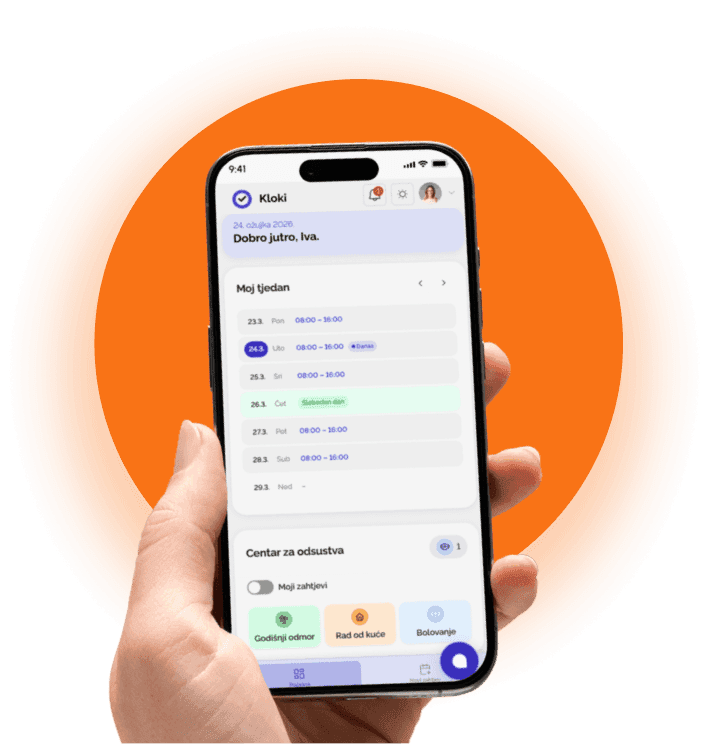
What it is: All-in-one work-time, leave, travel-order, and HR e-signature platform built for small and mid-sized employers.
What it does well:
- Work-time records that match how labour codes actually want them — clock-ins, clock-outs, overtime, night work, structured absence categories (vacation, sick leave, paid/unpaid leave, remote work). One record, audit-ready.
- Leave requests with proper workflow — employee submits, manager approves, the record updates automatically. No emails, no spreadsheets.
- Travel orders end-to-end — create, approve, attach expenses, settle. Digital flow instead of paper that sits on a desk for two weeks.
- E-signed HR documents — signed digitally with an audit-trailed QR stamp, valid for typical HR paperwork. No printing, no scanning, no folders.
- One-click reports for audits or labour inspections — a structured PDF with the full record.
- Audit log — every action is recorded: who approved, when, what changed.
- Clients and projects with billable tracking — assign team members and rates to a project, and the work overview automatically separates billable from non-billable hours.
- Shift scheduling per location — fast to create and edit shifts; payroll exports include shift types so payroll runs cleanly.
- Flat pricing — no per-user fee. A 10-person company pays the same as a 40-person one.
- Multilingual interface and human support.
Where it isn't ideal:
- No hardware integrations — if you need RFID readers or biometric access at a factory gate, an enterprise tool like Spica/AllHours fits better.
Good for: A 5–100 person company that needs clean employment records, leave, travel orders, and e-signatures in one place — without enterprise pricing.
Why generic project trackers often miss the point
This isn't about software quality. Clockify and Toggl are excellent products — for what they were built for. The mismatch is context.
Employment records are not project hours. Most labour codes ask for structured fields — overtime, night work, categorized absences — that a generic timer simply doesn't model. When an auditor or inspector shows up, "time off request" with no category isn't going to land well.
HR is more than a timer. A 20-person business doesn't just need a stopwatch — it needs leave management, travel orders, signed HR documents, and a clean export. If each of those lives in a different tool, you've built yourself a slower, more fragile process than the spreadsheet you were trying to replace.
Local fit matters. The right tool understands your week, your overtime rules, your reporting expectations. A global tool that doesn't model any of that will always feel one step behind.
Which one should you pick?
It really depends on what you actually need:
| You need… | Pick |
|---|---|
| Project tracking + hourly client billing | Clockify or Toggl |
| Remote-team monitoring with GPS / activity scoring | Hubstaff |
| Multi-country leave + attendance for an international team | Calamari |
| Compliant work-time + leave + shifts + travel orders + e-signature | Kloki |
If you run a 5–100 person business and your real question isn't "how many hours did dev spend on Project X" but "is the record clean, do I have all the paperwork, and will an audit go smoothly" — the answer is fairly obvious.
Try Kloki for free — and stop hunting for a tool that understands your problems. This one was built for them.